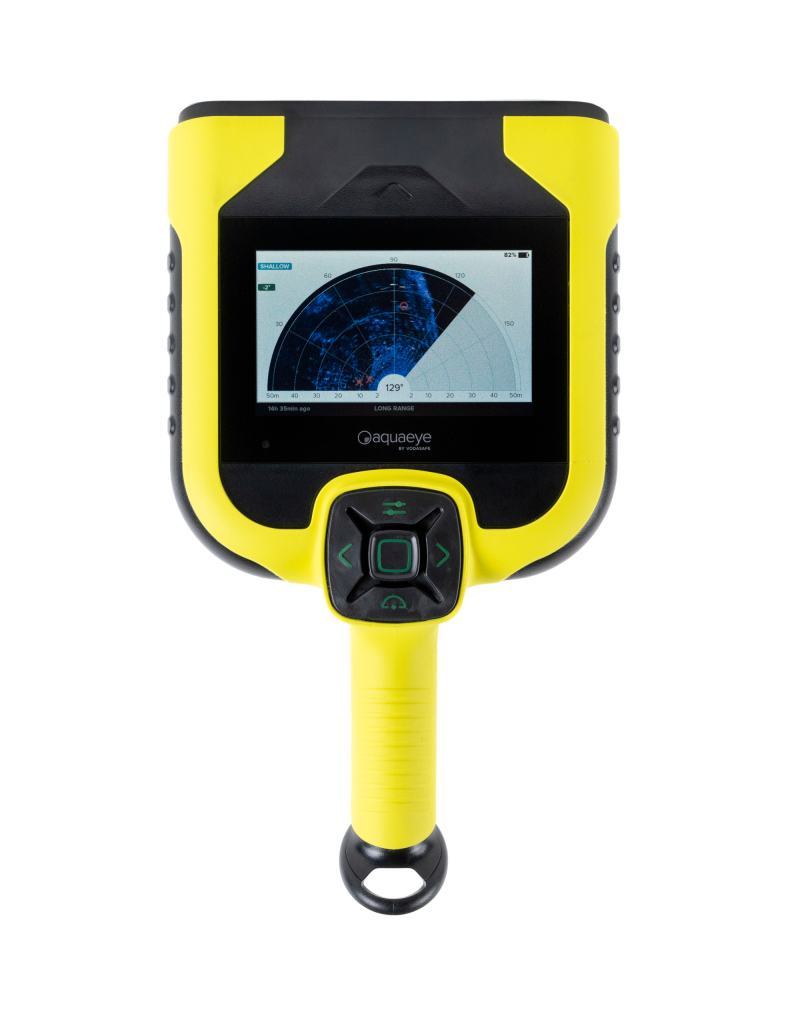
AQUAEYE PRO IS THE COMPLETE SOLUTION FOR CHALLENGING RESCUE MISSIONS

AquaEye Pro is a handheld sonar device designed for first responders and water rescue teams to quickly and efficiently locate lost individuals underwater. It combines advanced sonar technology with artificial intelligence (AI) to detect human bodies underwater.

Key Features of AquaEye Pro:

Quick Setup:
It is ready for use in minutes and can scan up to 8.000 square meters of water in less than five minutes.
Scanning Range:
It offers selectable detection range of 10 m, 20 m or 50 m depending on search conditions.
Portable and Durable:
Weighing approximately 1,4 kg (3 lbs), it's easy to carry. It floats, is waterproof, and is resistant to saltwater, sand, and impacts.
Long Battery Life:
Provides up to 8 hours of continuous scanning or over 16 hours of search mode.
User Friendly Interface:
It has a backlit display for low-light visibility and comes with a protective case, charging dock, cable, and user manual.

TO ACHIEVE GOOD RESULTS, APPROXIMATELY 2 HOURS OF TRAINING AND PRACTICE ARE REQUIRED. FOR PROFESSIONAL RESULTS, 1 DAY IS NECESSARY.

Your first sonar scan with AQUAEYE® will probably not be your most successful scan yet. Using AQUAEYE® requires training. This has nothing to do with the device's performance, but entirely with its correct use. Depending on the situation in the field, 2 hours of training may be sufficient. In complex situations, it is recommended that you train your team more intensively. Suitable professional trainers are available. However, how to proceed with the first scan:

FIRST SCAN WITH AQUAEYE®

  1. Gather all available information regarding the situation, as well as the local conditions. Depending on the situation, this can be done in the emergency vehicle. Armed with this information, operate the AQUAEYE® as follows.
  2. Unbox the device and turn it on. It will be ready to use in approximately 10 seconds.
  3. Choose the scanning distance: 10, 20, or 50 meters. The appropriate distance can be determined based on the location and previously gathered information. If there is little information, it is recommended to start with a longer range, i.e., 50 meters. Based on the initial information, you can narrow the distance and search the area in more detail.
  4. Enter the water – depending on your location, wading up to your waist is sufficient. Assume a secure and balanced stance. It is recommended to bend your knees slightly. Never scan with your arm extended; rest the device against your body and support the AQUAEYE® with your other hand without turning off the scanning sensor.
  5. Submerge the device below the water surface so that the screen is parallel to the water's surface. The sonar sensor is already adjusted to the correct angle for the initial scan. Depending on the waves, you may need to submerge the device further to ensure it can scan smoothly beneath the waves. Now pull the trigger. It is important to pull the trigger only underwater.NOTE: Do not pull the trigger if you do not want to start a new scan. Pulling the trigger will start a new scan and data will be lost.

    TIP: Often, attention is focused on the device during scanning, not the surroundings. In hazardous waters (animals, driftwood, and strong currents), you should scan in pairs. One person operates the scanner while the other observes the situation from a close distance.

  6. Slowly scan an area of ​​approximately 60-70 degrees. Ensure there are no white gaps in the feedback bar. If there are, the scan is either too fast or too shaky. Always scan from left to right and do not move the device backward to cover the white gaps in the feedback bar.
  7. The device collects a large amount of data during scanning and displays it on the screen. Don't worry, this is normal. Only after releasing the trigger (underwater) does the artificial intelligence calculate the collected data and eliminate some of the image objects.
  8. Remove the device from the water, interpret the results, and align the live cursor with the X. Follow the device's axis. By following the device's axis, you will obtain the direction in which the victim is located. AQUAEYE® also shows the distance and estimated depth. Please note that distances in calm water are difficult for humans to estimate.NOTE: You must maintain your reference position. If you moved during or after scanning, aligning the cursor with the corresponding icon may not guide you in the correct direction.
  9. If the results are unclear, you have the following options: Perform further scans with the correct distance preset, scan from a different location (5-10 meters to the left or right), or scan from deeper water. It is also recommended that you view and interpret the raw data displayed on the Echomap. Use this information to assess and interpret the situation.

Repeat the scanning process, or use the “Reach” feature if you want to scan from a high location such as a pier, boat, ship, or bridge.

TIP: Develop a routine with the device. To do this, you must practice regularly. As with any professional rescue device, AquaEye training is highly recommended.

THINGS YOU SHOULDN'T DO WITH AQUAEYE

  • AquaEye® is IP68 certified and waterproof up to 5 meters. Submerging AquaEye® in water deeper than 5 meters may damage the device.
  • Never scan from right to left. It won't work that way. Also, don't scan backwards to close the white spaces in the feedback bar.
  • Always pull and release the trigger underwater. If you don't, you'll get inaccurate results because the sonar cannot function in air. This is due to the sonar technology itself, not the device.
  • Handle the equipment carefully. Do not drop the equipment or throw it into water. The device contains gyroscopes that may get tangled. Store the device in the case provided for this purpose.
  • Do not test AquaEye® in a swimming pool. The sonar pulse will reflect off the walls, like light in a mirrored room. As a result, your target may appear on the screen several times. Reliable interpretation becomes impossible.
  • Do not use more than one AquaEye® device at the same time, and maintain a distance of at least 100, preferably 150 meters between them. Sonar signals will interfere with each other, and reliable results will not be obtained.
  • If your side-scan sonar is already in the water and actively scanning,
  • AquaEye® will interfere with weaker sonar signals. Detection will become impossible. The same applies to all boat sonars in the vicinity.
  • AquaEye® measures body density and volume. Some use water rescue mannequins for experimental purposes to test this. Experience shows that only a few are actually detected. Of course, because AquaEye®'s job is to distinguish between human and object. Water rescue mannequins should have the same body density as humans.
  • Water-filled or foam-filled water rescue mannequins often don't work. You should thoroughly test whether your water rescue mannequin is functioning correctly.
    Do not leave AquaEye® in direct sunlight for extended periods.
  • Do not store AquaEye® at very high temperatures (e.g., in a vehicle under extreme heat), otherwise it may cause permanent damage.
  • Do not attempt to open or disassemble AquaEye®. Otherwise, it may result in injury or death.
  • Do not charge AquaEye® while wet, and do not charge AquaEye® with any charging equipment other than the one provided.

AQUAEYE® – IN WHICH RESCUE AREAS AND RESCUE APPLICATIONS IS AQUAEYE USED WORLDWIDE?

AQUAEYE® is primarily used in situations involving the rescue or extraction of drowning victims. It is a vital tool for rescue teams who have already arrived at the scene and where every second counts in saving or rescuing the affected person. AQUAEYE® is specifically designed for this purpose and is an indispensable tool for professional rescue teams. Deployment of traditional rescue teams takes some time. Typically, these teams must first dress appropriately (e.g., put on wetsuits) or prepare their diving equipment. Preparing rescue equipment such as boats or side-scanning sonar also takes several minutes. This time is generally not available for operational rescue in the water.

However, it may take some time to dispatch resources to the scene for rescue. During this time, it is possible to obtain an initial overview of the situation at the scene with AQUAEYE®. The device can be activated in seconds to perform the initial scan and survey the terrain.

AQUAEYE® is primarily used in situations involving the rescue or extraction of drowning victims. It is a vital tool for rescue teams who have already arrived at the scene and where every second counts in saving or rescuing the affected person. AQUAEYE® is specifically designed for this purpose and is an indispensable tool for professional rescue teams. Deployment of traditional rescue teams takes some time. Typically, these teams must first dress appropriately (e.g., put on wetsuits) or prepare their diving equipment. Preparing rescue equipment such as boats or side-scanning sonar also takes several minutes. This time is generally not available for operational rescue in the water.

However, it may take some time to dispatch resources to the scene for rescue. During this time, it is possible to obtain an initial overview of the situation at the scene with AQUAEYE®. The device can be activated in seconds to perform the initial scan and survey the terrain.

If it's not possible to get a general overview of the underwater situation using sonar, underwater rescue teams often rely on a rescue chain. This means the area will be searched by multiple rescue workers. Searching an 8000 m² area takes at least 30 minutes or more, depending on the personnel involved. Depending on the water conditions, rescue teams may also be at risk. Rescue teams involved in the rescue chain may not be available to rescue people elsewhere. This is especially true in major disasters. AQUAEYE® can help you use fewer resources in a single location, enabling faster and more effective rescues.

AQUAEYE®, like many rescue tools, is an additional option in your rescue tool portfolio. It does not replace another device you already own. It provides first aid to first responders and ensures better coordination within your team. It bridges the gap between professional rescue equipment and minimal rescue equipment. Like any rescue device, AQUAEYE® does not guarantee 100% safe rescue, but it greatly increases the chances of success and speed of a rescue mission. Fire departments, water rescue teams, lifeguards, technical assistance organizations, military and civil protection teams, as well as private individuals, for example those operating a beach or hotel, can use Aquaeye after appropriate training.

AQUAEYE® gets the job done even where others wouldn't dare go with their expensive equipment. Near cliffs and rocks, between pier pilings or in narrow harbors.

Flat Water

  • Overall Score: 9/10
  • Performance: Excellent
  • Details: Lakes and calm ponds provide optimal conditions. Targets and debris are easily distinguishable.
  • Operational Insight: The ideal training environment. Echo Map and Target Display work together to locate open targets and targets near obstacles such as logs or plants.

Marinas, Ports, Docks

  • Overall Score: 7/10
  • Performance: Good but challenging.
  • Details: Complex sonar environments due to piles, keels, columns, and scanned foundations. All of these can lead to inaccurate results.
  • Operational Information: Echo Map helps distinguish objects.
  • Take your time to carefully interpret the readings. Large areas of water can be effectively scanned, but areas close to the shore may still require manual scanning.

Ocean and Wave Motion

  • Overall Score: 6/10
  • Performance: Average
  • Details: Breaking waves and surface movement interfere with sonar signals. Stable operation is crucial.
  • Operational Information: For best results, conduct your scans between wave troughs. Training for this environment is strongly recommended. Handle shore waves carefully and remain as still as possible during scanning.

Dynamic Water Currents

  • Overall Score: 2/10
  • Performance: Poor
  • Details: In fast-flowing waters, highly aerated water interferes with sonar signals. Shallow and rocky bottoms further limit effectiveness.
  • Operational Information: AquaEye is not recommended for this environment. Only calm pools adjacent to flowing water may offer suitable conditions.

Dynamic Water – Flowing Rivers

  • Overall Score: 7/10
  • Performance: Good
  • Details: AquaEye works effectively in moving waters with a steady flow. Both displays (Target and Echo Map) help in navigating and interpreting the environment.
  • Operational Information: Maintain consistent scanning patterns. Adjust range as needed based on available power and water clarity.

Ice Rescue

  • Overall Score: 7/10
  • Performance: Good
  • Details: AquaEye works reliably after being submerged in water through an ice hole. Visual feedback may be reduced due to reflection or refraction beneath the ice.
  • Usage Recommendation: Use a long extension arm (~3–5 ft) to stay dry.
  • Apply scanning techniques in icy conditions to achieve the best results.

Black Water

  • Overall Score: 9/10
  • Performance: Excellent
  • Details: AquaEye performs very well in murky, dark, or black water. These conditions have a minimal effect on the clarity of the sonar signal.
  • Operational Insight: Target Imaging and Echo Mapping remain highly effective in these environments, making AquaEye a reliable choice for low-visibility water searches.

Plant Life

  • Overall Score: 5/10
  • Performance: Average
  • Details: Dense vegetation can interfere with sonar signals and lead to false positives. It is difficult to distinguish between real targets and the shadows of the vegetation.
  • Operational Information: Scanning from multiple angles is recommended. Brief and
  • Using the Medium Range settings helps reduce blind spots and signal loss. The Echo Map Indicator helps identify vegetation zones.

The Big Wreck

  • Overall Score: 6/10
  • Performance: Average
  • Details: Large submerged debris, such as trees and logs, frequently produce false positive results. This is common in flooded areas and along coastlines.
  • Operational Information: The Echo Map Display can be used to better interpret complex sonar returns, although some sections may still require manual confirmation. Practice is needed to filter out sonar interference.


AQUAEYE® – AREAS OF APPLICATION

AquaEye® expands the range of options that rescue teams can use quickly and easily. It enables rescue teams to perform faster and safer rescue operations and requires fewer personnel resources for rescue missions.

AquaEye® uses SONAR technology. This abbreviation stands for Sound and Navigation Ranging. Sonar sends sound waves into the water, like dolphins, and picks up the echoes created by objects or living things. Sonar measures the time it takes for the sound wave to be received again. Sound waves from objects and living things differ in many criteria, and AquaEye®'s artificial intelligence (AI) can measure, evaluate, and visualize these differences.

AquaEye® and AI-powered SONAR technology are used in the following situations:

  • In rescue operations (rescue of people or animals).
  • In rescue operations (rescue of people or animals).
  • In underwater object detection (AI can also detect objects).
  • In clean or very murky water (beaches or river pools)
  • In heavily polluted water after storms or disasters
  • For use by professional rescue divers.
  • For use by lifeguards and lifeguards.
  • For use by fire departments.
  • Used by the police.
  • Used by rescue organizations
  • For use by military forces
  • For use in diving or open water/swimming.
  • Use near the beach / standing or kneeling
  • For use on boats, piers or in harbors.
  • Using jet skis or surfboards
  • Use in rivers, lakes or the sea
  • Usage after flood disasters
  • In the search for missing persons or animals

Shore scanning


When dredging from the shore, wade into the water up to your waist before starting the dredging.

Scanning from the dock


When crawling from the dock, lie on your chest and use both hands for greater balance.


AQUAEYE® – IMPORTANT NOTES

AquaEye® is designed to detect human bodies underwater. Using ultrasound and artificial intelligence technologies, AquaEye® scans open water areas up to 50 meters, following the instructions in this guide, and displays a visual representation of victims in the search area. This image allows emergency responders to locate and respond to drowning victims. AquaEye® is a life-saving aid for first responders and does not prevent drowning or injury.

AquaEye® is designed for use in unobstructed open water areas, including the following environments:

  • lakes and oceans,
  • water retention ponds and swimming pools,
  • Rivers where underwater debris is limited.

AquaEye® is designed for use by trained first responders, including:

  • lifeguards,
  • search and rescue teams,
  • cops,
  • firefighters,
  • armed forces,
  • health workers,
  • first aid personnel.

Improper use may endanger people and cause damage to the device. AquaEye® should only be operated under the conditions of use described in this document.

AquaEye® is not designed for use in small, enclosed bodies of water, including the following:
  • vehicles and buildings submerged underwater,
  • swimming pools, wave pools and water slides,
  • storage tanks and wells.

The previous model, the AquaEye Lite, is available in limited quantities in our European warehouse and will be delivered while stocks last. This model is being replaced by the new AquaEye Pro model. The AquaEye Lite can be remanufactured upon request with a minimum order quantity of 50 units.
AquaEye PRO and training are closely related. Completing a user training course is mandatory when purchasing AquaEye PRO. It is the responsibility of each customer to ensure that the person using the device has completed or will complete certified training.

The AquaEye PRO is a specialized rescue device designed to locate people lost in water and should only be used by trained personnel. It is strongly discouraged from being given to untrained or uninformed individuals, as improper use may delay or hinder lifesaving operations.

AquaEye Advantages

Ready for immediate use: Scans in seconds – just put it in water.
Accurate detection: AI-powered sonar shows the location and depth of people.
Time saving: Reduces search time by up to 90%.
Safe operation: Fewer dives, less risk for rescuers.
Durable and portable: Waterproof, floating, shockproof and easy to use.
Data storage: Scans are automatically saved and can be reviewed later.

How Does AquaEye Work?

Firstly, AquaEye Turn on the device and gently place it in the water where the search will begin.
The system then emits sonar waves that propagate through the water and return as echoes from objects below the surface.
AquaEye's built-in AI processes these returning echoes in real time to identify human bodies and display their orientation and depth.
Once the target is identified, it is clearly highlighted on the screen so rescue teams can immediately take action and head straight to its exact location.

AQUAEYE PRO – TECHNICAL SPECIFICATIONS

Device Type:
Handheld sonar search device with AI target recognition

Detection Range:
Radius up to 50 meters (164 feet)
Selectable: Short (10m), Medium (20m), Long (50m)

Target Detection:
AI-powered human body recognition
Shows direction and depth of targets

Sonar Technology:
Dual-frequency sonar for improved accuracy and fewer false positives

Screen:
Backlit display for day/night use
Combined echo map and target layer

Scan Storage:
Internal memory for automatic scan storage
Wireless download via Bluetooth and mobile app

Battery:
Rechargeable lithium-ion battery
Up to 8 hours of continuous scanning
More than 16 hours of use in search mode

Charge:
Charging dock and USB-C cable included.

Durability:

Waterproof and submersible (IP68)

Shockproof and floats in water.

Operates in saltwater, sand and debris conditions.

Weight:
Approximately 1,4 kg (3,1 lbs)

Operating temperature:
-10°C to +50°C (14°F to 122°F)

Included with the Device:

AquaEye Pro handheld unit

Charging dock and power cable

Carrying bag

User manual

Education included

AQUAEYE® – THE FIRST MOBILE SEARCH AND RESCUE SONAR WITH ARTIFICIAL INTELLIGENCE

AQUAEYE®, manufactured by VodaSafe, is an advanced underwater sonar scanner that uses cutting-edge sonar technology and artificial intelligence to detect human bodies underwater and in low-visibility waters. AQUAEYE® is the first search and rescue sonar of its kind, assisting first responders in water rescue operations. It is suitable for missions to rescue and retrieve victims, even from contaminated waters.

This lightweight, portable underwater sonar device is ideal for first responders in search and rescue missions. Water rescue allows rescuers to rapidly survey an area of ​​up to 8000 m² of water, locating potential victims quickly. The advantage of using AQUAEYE® is the rapid assessment of the underwater situation and the resource-saving coordination of rescue teams.

Water rescue and rescue teams invest in AQUAEYE® for three reasons:

Accelerating rescue and recovery processes
Increasing the safety of their own teams
Reducing required recovery resources

AQUAEYE® is used by water rescue teams, whitewater rescue teams, fire departments, technical rescue agencies, lifeguards, law enforcement, aid organizations, and search and rescue teams. AQUAEYE® is the world's first and only wearable sonar device that uses artificial intelligence to specifically search for people in the water.

AQUAEYE® PRO – WHAT ARE ITS BIGGEST ADVANTAGES?
WIDE SEARCH AREA
With AQUAEYE, up to 8000 square meters of water can be searched and assessed in less than five minutes. AQUAEYE is a tool that helps first responders coordinate rescue efforts. By first assessing the underwater situation, you can direct rescuers to the location of a potential victim identified by AQUAEYE.

ARTIFICIAL INTELLIGENCE
Using artificial intelligence, AQUAEYE determines which echoes are human and displays the location of potential victims on-screen. Distance, direction, and approximate depth can be determined and used to inform rescuers. Additional situational information can be obtained from the sonar raw data display (EchoMap).

RESCUE AND RECOVERY
It's not always possible to rescue a victim alive. AQUAEYE increases this chance, but there's no guarantee it will rescue someone alive. However, AQUAEYE can and has been used not only for rescue but also for searching for and rescuing victims.

SONARTECHNICS
AQUAEYE emits a sonar pulse to a depth or distance of 50 meters and analyzes the returned echo using state-of-the-art AI-powered sonar technology. AQUAEYE marks potential victims with an X, and targets that are not clearly identifiable but have a high probability of being a victim are marked with an O.

TEAM SAFETY
With AQUAEYE portable rescue sonar, rescuers can detect potential victims for the first time within seconds of immersion. This change in search tactics in water rescue can have a positive impact on the safety of your rescue team, as water is often a dangerous place. Therefore, the fewer rescuers entering the water, the safer you will be and the fewer resources you will require. These facts are especially important in the aftermath of natural disasters.

RESOURCE EFFICIENCY
By expediting the search process, AQUAEYE can significantly reduce the time your team spends in the water. Rescue teams can be directed to the scene with targeted and accurate guidance. Efficient resource utilization is crucial, as during lengthy water rescues or recovery operations, teams stranded in one location can create resource bottlenecks at other search locations, potentially leading to longer response times and increased man-hours.

GOOD READABILITY
AQUAEYE is very easy to use and is ready to use quickly. The screens are backlit, high-contrast, and readable even underwater. Using and interpreting AQUAEYE search results requires practice, but after approximately two hours of training, you can achieve high-quality results in complex scenarios.

SONAR SCAN DETAILED INFORMATION
It's not always possible to get close enough to rocks with expensive side-scan sonar. Or, you have to worry about using it around numerous obstacles in the harbor. Using such sonar under a pier might also be unwise. This is where AQUAEYE comes in, ideal for searching, rescuing, or rescuing victims in such locations.

LOW OPERATING COSTS
AQUAEYE is designed to keep your costs low. However, it's not just the purchase cost of the device that should be considered; it's also the savings you can achieve by using it throughout your organization. In particular, consider TCO (Total Cost of Ownership). AQUAEYE is built to be robust and durable, yet suitable for a wide range of application scenarios.

NEW: DUAL FREQUENCY AND TARGET DETECTION
Dual Frequency Sonar and Enhanced Target Detection
AquaEye Pro uses two sonar frequencies to minimize false positives and reliably detect missing persons – for maximum search accuracy.

NEW: SCAN SAVING AND DOWNLOADING
Scan Saving and Downloading
Call data is automatically recorded on the device and can be downloaded via Bluetooth and the app. This is ideal for post-mission review and documentation.

ARTIFICIAL INTELLIGENCE
Built-in AI for Smarter Search
AI processes sonar data in real time, helping to distinguish human targets from debris and significantly reducing search time.

NEW: IMPROVED ECOMAP AND TARGET COVERING
Improved Echo Map and Target Covering
Target and surrounding maps are combined for a clear, easy-to-read display – helping responders make quicker decisions during rescue operations.

NEW: GAIN ADJUSTMENT AND SIGNAL INDICATOR
Automatic Gain Adjustment and Signal Indication
AquaEye Pro automatically notifies you when gain settings need to be adjusted, ensuring reliable performance in a variety of water conditions without requiring expert knowledge.

DEPTH INDICATOR
Depth Indicator for Each Target
AquaEye Pro displays the depth of each detected target, providing responders with critical information to plan safe and effective rescue actions.

English English Turkish Turkish